
Screenshots


App details
- Updated
- 2024-10-30T10:47:51.043264Z
- Requires
- Windows 10 version 17763.0 or higher
- Language
- English
- Developer
- LogsNX
- Category
- Mobile
SoftPas in:
This product is also available in the following languages:
About LogsNX POS
Download LogsNX POS – POS software, retail management, inventory tracking, sales tracking, business operations, ERP integration, point-of-sale system, business tools
Overview
LogsNX POS is a desktop-based application designed to enhance point-of-sale operations for businesses across retail and service sectors. Its primary purpose is to streamline transaction processes by integrating directly with existing ERP systems, enabling businesses to manage sales, inventory, and customer data efficiently. By reducing manual data entry and minimizing transaction errors, the software addresses common pain points in traditional sales workflows. It is particularly suited for small to medium-sized enterprises that require scalable, centralized tools for managing multiple business locations or entities.
Real-world use cases include quick checkout in retail stores, return processing, invoice creation, and customer profile management. The software supports businesses aiming to improve operational speed and customer satisfaction through digital transformation. The developer, LogsNX, positions the app as a utility tool for modern business operations, emphasizing integration and automation. Although the developer did not provide additional technical details about their background or history, the app’s focus on ERP connectivity suggests a targeted approach to business efficiency. Its role in the broader business software ecosystem lies in bridging the gap between front-end sales and back-end enterprise systems.
Key Features & Functionality
- Effortless Product Search: Staff can locate products instantly using barcode scanning or name-based search, reducing checkout time and improving customer experience.
- Streamlined Invoice Management: Create, edit, and process returns on sales invoices with minimal steps, ensuring accurate record-keeping and smoother post-sale processes.
- Comprehensive Customer Management: Store and retrieve customer profiles to track purchase history and preferences, supporting personalized service and targeted marketing.
- Flexible Payment Options: Support for multiple payment methods enhances checkout convenience and increases transaction success rates.
- Multi-Company Management: Switch between different business entities within a single interface, ideal for organizations operating multiple locations or brands.
For example, a retail chain with three locations can use LogsNX POS to manage sales and inventory across all sites from one dashboard. A service provider can quickly create invoices and record payments while maintaining client records. The integration with ERP systems ensures that sales data flows seamlessly into accounting and inventory modules, reducing duplication and delays. These features collectively support faster operations, improved accuracy, and better decision-making for business owners.
Interface, UX & Performance
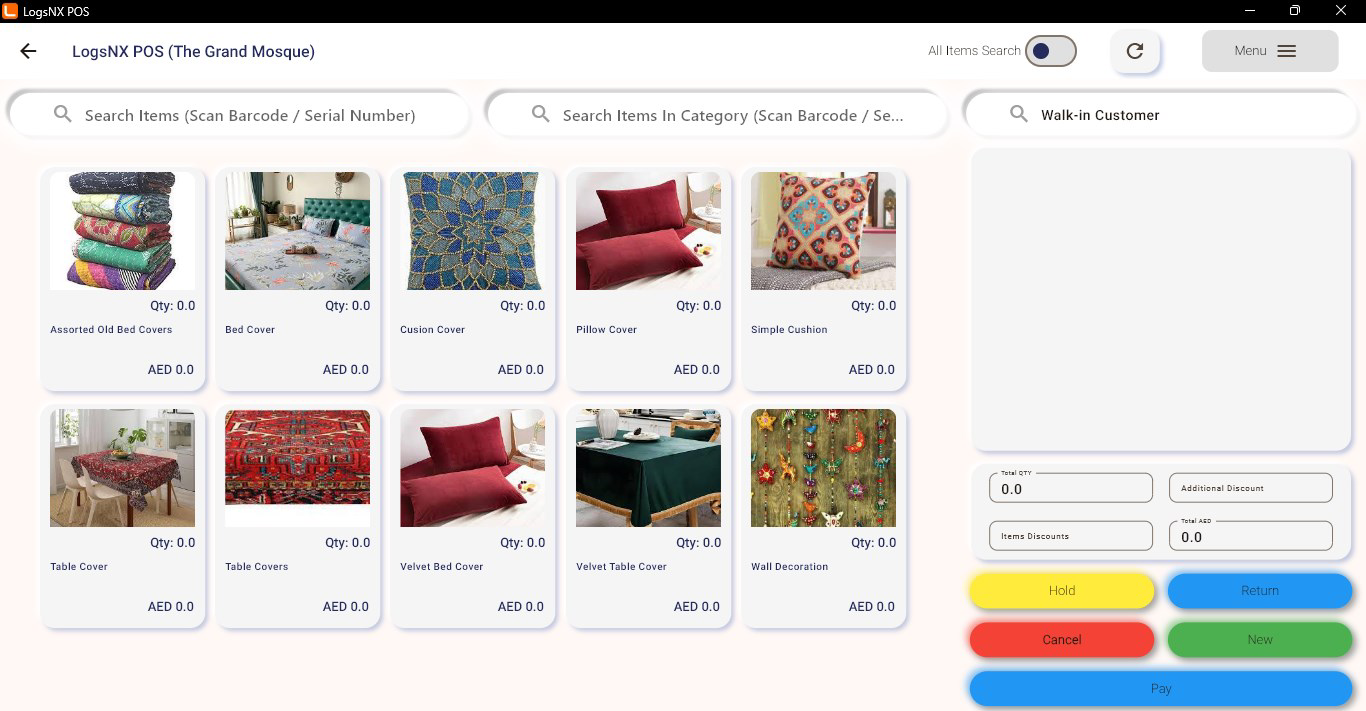
The interface of LogsNX POS appears designed for functionality and speed, prioritizing accessibility for staff with minimal training. The layout likely organizes key functions—product search, checkout, invoice management, and customer profiles—into intuitive sections, minimizing the need for complex navigation. Visual style is expected to be clean and professional, aligning with standard business software aesthetics, with clear labels and logical grouping of controls.
Navigation flow is optimized for high-volume environments, allowing users to complete transactions with few clicks. The application is expected to respond quickly during peak hours, though specific performance metrics were not disclosed. Although the developer did not list formal performance metrics, the app’s focus on efficiency suggests responsiveness across mid-range desktop systems. Stability appears to be a priority, as the app is designed for continuous use in commercial settings. Users should experience minimal lag or crashes during routine operations. The developer did not specify minimum OS requirements, but the 25.6 MB file size indicates a lightweight footprint, which may contribute to faster load times.
Platform Compatibility & Technical Requirements
LogsNX POS is available as a desktop application, designed to run on Windows-based systems. The app is currently released in version 1.0.0, with a file size of 25.6 MB. The platform is specified as desktop, meaning it is not available for mobile devices such as Android or iOS. The developer did not specify minimum OS requirements, so compatibility with older or newer Windows versions cannot be confirmed. Similarly, no details were provided about hardware requirements, such as RAM or processor specifications. Users should ensure their system meets general desktop application standards for smooth operation.
Pros and Cons
Pros
- Seamless ERP integration for unified business operations
- Efficient product search with barcode and name support
- Multi-company management for businesses with multiple locations
- Free to download and use, reducing initial setup costs
- Streamlined invoice and return processing for faster sales cycles
Cons
- Not available on mobile platforms (Android, iOS)
- Developer did not provide detailed system requirements
- Desktop-only deployment limits flexibility in remote or mobile operations
- Specific performance benchmarks were not disclosed
- Customer support or update frequency information was not provided
FAQ
Is LogsNX POS available for mobile devices?
LogsNX POS is currently designed as a desktop application and is not available for Android or iOS devices.
Can I use LogsNX POS with my existing ERP system?
Yes, the app is built to integrate with ERP systems, allowing for seamless data exchange between your point-of-sale operations and back-end business management tools.
Is LogsNX POS free to use?
Yes, the app is available at no cost, making it accessible for small and medium-sized businesses looking to enhance their sales operations without upfront licensing fees.
What operating systems does LogsNX POS support?
The app is designed for desktop use, but specific OS compatibility details were not provided by the developer.
How often is LogsNX POS updated?
Information about update frequency was not disclosed by the developer.
Final Thoughts
LogsNX POS stands out as a focused, efficient tool for businesses aiming to modernize their point-of-sale workflows through ERP integration. Its core features—product search, invoice management, customer tracking, and multi-company support—address real operational challenges in retail and service environments. While the desktop-only availability may limit flexibility for remote teams, the app’s lightweight design and free pricing make it a compelling option for businesses already invested in desktop-based operations.
For business owners managing multiple locations or seeking to reduce manual errors in sales processing, LogsNX POS offers tangible value. It enhances speed, accuracy, and customer satisfaction—all critical components of competitive business operations. With its clear focus on integration and usability, it fills a niche in the business tools market.
Download LogsNX POS now
Guides & Tutorials
How to install LogsNX POS
- Click the Download button above.
- Once redirected, accept the terms and click Install.
- Wait for the LogsNX POS download to finish on your device.
How to use LogsNX POS
This software is primarily used for its core features described above. Open the app after installation to explore its capabilities.
User Reviews
No reviews yet. Be the first to share your experience.
You may also like
more
Que no te pillen¡
About !Que no te pillen¡Reviewed by Jason A. BilbreyShow MoreShow Less

3D Combat Zone
About 3D Combat ZoneOriginally released in 1983, 3D Combat Zone immerses players...

666: El día del portal
About 666: El día del portalOn June 6, 2006, Agent P. Stone uncovers a sinister...

80 in 1 Best Flash games
About 80 in 1 Best Flash games 80 in 1 Best Flash games is a collection of 80 fl...

ABYSS SEEKERーーWhat Do You See Deep in The Abyss
About ABYSS SEEKERーーWhat Do You See Deep in The AbyssIn ABYSS SEEKER, players...

ACA NEOGEO THE KING OF FIGHTERS 2002 for Windows
About ACA NEOGEO THE KING OF FIGHTERS 2002 for WindowsTHE KING OF FIGHTERS 2002,...